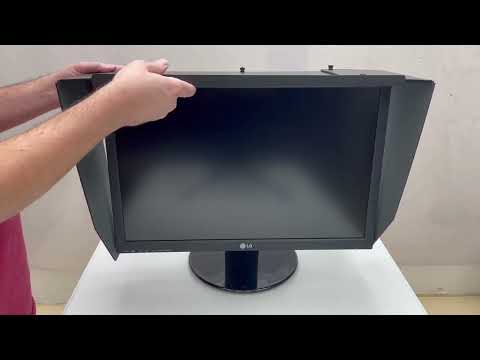
We can shorten the side length of any universal monitor hood as needed.
The charge for this is $10.00 / hood and can be specified on the product page.
Ordering is Easy as 1,2,3:
How to Measure:
To order your hood - Measure the OUTSIDE TOP dimension ( A ) of your monitor. Top left outside corner to top right outside corner. You will need this measurement to specify the length for us to cut the support bar.
Measure the B ) dimension of your monitor, top outside corner of the monitor down to the lower outside corner. You will need this measurement especially if you select to modify the side length of one of our standard hoods.
With the sizes from steps 2 & 3, select the best size fit from the chart above.
If you do not have an Apple Monitor, our Universal Hood will most likely fit your needs.
We offer sizes to fit most monitors. If your monitor is different than the typical desktop, you may need a custom built hood. All hoods will fit both CRT or Flat panel monitors.
These laptop hoods are essential for people on the go / out in public with their laptop!
Customizing Our Hoods:
If our standard hood sizes do not meet your needs, we can customize one for you. The most common modifications are shortening the sides (+$10.00 / hood) or placing a calibration door (+$30.00 / hood).
Other options include decreasing the hood depth or lengthening the sides. Both these options are available on our products page. We also have options for dual monitor setups etc.
Photodon assures a good quality product and excellent service!
Don, We received the hoods and they're awesome. Like I expected, your products are great and for the price, unbeatable. Our designers are already asking for their own. I was their guinea pig.
I also liked those Zeiss wipes you included (including the microfiber cloth!). That's the next thing we'll order along with the additional hoods. I'll also recommend your products to our affiliates and fellow design firms.
Vince @ Akira Graphics
Installation:
The monitor hood is shipped with its sides folded in a flattened state. The sides simply fold back out. The top width is easily adjusted to fit your monitor. The hood attaches with an elastic cord that is attached to one side of the hood, goes around the backside of the monitor then hooks to the other side of the hood. Installation takes about fifteen minutes.
The Photodon monitor hood includes a complete installation package:
One quality, hand inspected hood
Elastic cord attachment
Plastic support strip
Detailed, easy to follow instructions for installation
Read what our customers are saying about us!
Dear Sir, Thank you for sending the monitor hood, I received it Monday 18th, very prompt. The hood is marvelous, I no longer have the window shining on my screen. It's made going on the computer a pleasure, thank you.
We are capable of adding a calibration door into the top of our monitor hoods. This slider door will allow you to calibrate your monitor without having to remove the hood. The door dimensions are 3" x 2" and allows the calibration device or the cord to be passed through. The door is located in the center rear of the top panel. Check this option when ordering.
Material type / interior finish:
These monitor hoods are made of durable, high-density fiberboard. The front edges are protected and reinforced with plastic strips. Simulated Black Leather type material has flat black textured interior finish.
Additional Monitor Hood Benefit Information:
The one piece top front edge: Standard for All Hoods, Increases stability of the hood, Decreases the set-up time, No sagging across the top.
Photodon monitor hoods were mentioned in Photo Techniques Magazine, Sept/Oct 2003, article "Calibrating the Digital Darkroom".
Creates a shaded environment to help achieve screen color consistency. This aids in accurate and reliable color calibration for color-critical applications such as computer graphics and desktop publishing.
Reduces glare while adding nothing extra to look through. Covering the screen with a filter material can affect the overall screen brightness, especially with the color white. The use of a monitor hood, in conjunction with some of our glare and reflection reduction ideas, can greatly enhance your viewing pleasure and reduce eyestrain.
Great for office environments by reducing ambient lighting caused by fluorescent lights and also reducing screen image washout. Screen washout from the sun may only occur for a few minutes a day but sometimes lasts for up to several hours. The length and amount of washouts can change daily and with the shifting of the seasons.
Offers options by creating a localized shaded environment in situations where your co-workers may have different needs.
Provides privacy especially in areas where computers are side by side, such as in libraries, computer labs, cyber-cafes, classrooms, testing facilities and in the workplace. These can be helpful in areas where sensitive materials and documents are handled, such as banks, law offices or medical facilities. A hood will keep confidential information secure in sensitive environments, helping you meet your HIPPA & GLBA requirements.
Helps to reduce eyestrain. Because the eyes play such a large roll in processing information on the screen, any reduction in screen glare can have health benefits including a reduction in eyestrain, fatigue and headaches.
The inside surfaces provide added space for program-shortcut notes, photos or other notes of inspiration.
Read what our customers are saying about us!
Don, Thanks so much for getting everything out so quickly - the hoods arrived by noon, and we had them installed in the next hour. 24-hours from order to installation is pretty good!
Thanks for your help.
Glare Reduction Ideas:
Ambient light reflecting off monitor screen surfaces causes light to reflect back at the viewer. On a curved surface screen, there is much reflection off the monitor due to its convex shape. This surface reflects light sources directly at the viewer, even when the light source is at an extreme angle to the monitor.
You can check screen surface reflections by looking into your screen with the monitor off. These reflections, which include an image of yourself, can obscure the screen image you want to see, causing unnecessary distractions. Observe and implement as many of these glare reduction ideas as possible:
Wear darker clothing. Lighter colored clothing reflects more light.
Place the monitor where light sources are off to the side and not directly behind the user.
Close shades or curtains.
Turn off overhead lights or any lights that are directly behind the user.
An individual task light may replace other lights, but be sure that it does not shine onto the screen or your eyes.
A glare-reducing screen is also an option but be sure it does not affect the overall screen brightness, especially of the on screen whites. Or, if you're concerned about color calibration, make sure the screen isn't tinted.
Tilting the screen slightly downward also helps in reducing reflections but may not be ergonomically correct, unless you raise the monitor up.
A hood can effectively reduce the amount of ambient light from the sides and above from reaching the surface of the screen.
If you do not have an Apple Monitor or computer, our Universal Hood will most likely fit your needs.
HIPAA & GLBA:
HIPAA law does not specifically say that a monitor hood is a compliant device (it is much more general than that) it does state: Under Incidental Uses and Disclosures, [45 CFR 164.502(a)(1)(iii)]
General Provision. The Privacy Rule permits certain incidental uses and disclosures that occur as a by-product of another permissible or required use or disclosure, as long as the covered entity has applied reasonable safeguards and implemented the minimum necessary standard, where applicable, with respect to the primary use or disclosure.
Reasonable Safeguards. A covered entity must have in place appropriate administrative, technical and physical safeguards that protect against uses and disclosures not permitted by the Privacy Rule, as well as that limit incidental uses or disclosures. See 45 CFR 164,530(c).
HIPAA - The Health Insurance Portability and Accountability Act of 1996
This law requires new safeguards to protect the security and confidentiality of information. The law mandates new and stringent standards for patient privacy protection, insuring the privacy and security of medical information both in electronic and printed format. Full compliance, in most cases, is required by federal law by April 14, 2003. The ruling applies to health care providers, hospitals, insurance offices, doctor offices and health clearinghouses. More information is available at: http://hhs.gov/ocr/hipaa/.
GLBA - The Gramm-Leach-Bliley Act
Enacted in 1999, GLBA requires financial institutions to protect non-public personal information (NPI) for distribution beyond the financial institutions network. The Gramm-Leach-Bliley Act requires government agencies that regulate financial institutions to implement regulations to carry out the Act's financial privacy provisions (GLB Act). The regulations required all covered businesses to be in full compliance by July 1, 2001.A key GLBA provision requires all financial services organizations to protect the security and confidentiality of their customers nonpublic personal information (NPI).